
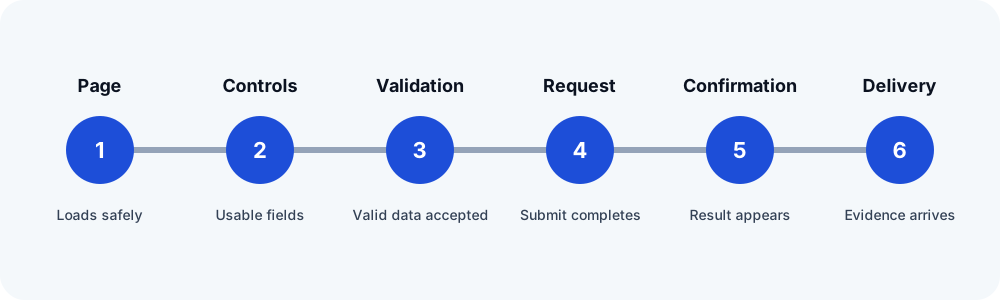
Verify the widget from the public page
Use authorized synthetic data and test the published page, not only the editor preview. Confirm required fields, labels, validation, the submit button, and the visible success or error message. Record browser and request errors. A page refresh or server error can indicate a plugin, theme, optimization, or server conflict before email is relevant.
Inspect Actions After Submit
Open the Form widget and review Actions After Submit. Confirm that Email is present when an email is expected and that other integrations are not being confused with the email action. Then inspect the Email fields:
- Verify To, From Email, From Name, Reply-To, subject, and message.
- Confirm referenced field IDs exist and are unique. Elementor's
[all-fields]output depends on valid field identifiers. - Use an authorized domain sender rather than the visitor's address.
- Check Email 2 separately when an acknowledgement is also expected.
Use Submissions as a separate checkpoint
Where the Submissions feature is enabled and appropriate for the site's privacy policy, look for the unique test marker. A stored submission supports that Elementor processed and retained the form data. It does not prove that the Email action ran successfully or that a mailbox accepted the message.
Trace WordPress mail and integrations
Elementor's official guidance explains that form email uses WordPress mail handling and may depend on the host or an SMTP service. Check an approved mail log or provider event, sender authentication, spam or quarantine, and the recipient route. If Mailchimp, ActiveCampaign, a webhook, or another action is involved, test it as its own destination with its own evidence.
Prepare a useful escalation
Include Elementor, Elementor Pro, WordPress, PHP, and relevant integration versions; the redacted Actions After Submit list; the exact visible result; whether a stored submission exists; the mail/provider event; and the last confirmed step. Do not paste credentials, visitor data, access tokens, or an unredacted production submission into a support ticket.
Related FormRook guides
Official sources reviewed
Reviewed 2026-10-13. Confirm the current vendor guidance before changing a production site.