
Prepare a safe test
Confirm that you or your client authorizes the submission. Choose a form without payment, identity verification, destructive side effects, or a human challenge you would need to bypass. Agree on a clearly synthetic name, address, subject, and message. Decide where the test should arrive and how it will be removed from the inbox, CRM, automation, and entry log.
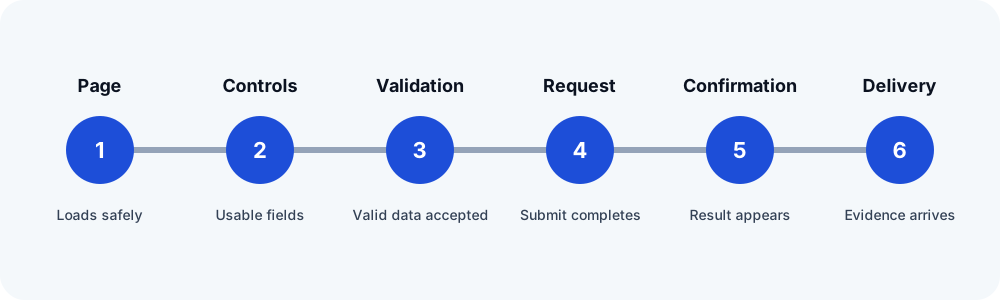
Run the six-step check
- Load the public page. Test the canonical public URL in a private browser session. Record redirects, consent banners, browser errors, and whether the intended form appears.
- Inspect and operate the controls. Use a keyboard as well as a pointer. Confirm labels, required indicators, focus order, conditional fields, and submit-button access at desktop and mobile widths.
- Exercise validation. Submit once with required data missing, then correct the errors. An error should identify the affected field, preserve safe values, and allow recovery.
- Submit synthetic valid data. Record the time and a unique nonsecret marker. Watch for a stalled spinner, disabled button, JavaScript error, blocked request, or unexpected page navigation.
- Verify the visible result. Capture the confirmation message, page, or redirect. A success message proves only that the browser reached that state; it does not prove notification delivery.
- Verify the configured destination. Check the plugin entry where available, the expected mailbox or test sink, and any authorized downstream system. Correlate the unique marker and record which destination you did and did not inspect.
Record an evidence ladder
| Evidence | What it supports | What it does not prove |
|---|---|---|
| Page and form visible | A visitor can reach the starting point | Validation, submission, or delivery |
| Request completed | The browser received a response | Correct server processing or notification |
| Success state visible | The configured front-end result appeared | Mailbox, CRM, or human follow-up |
| Plugin entry present | The application stored an entry | Notification delivery |
| Correlated message received | The configured checked destination received this test | Inbox placement everywhere or future delivery |
Test failure and cleanup
Repeat only enough to determine whether the problem is stable. Save redacted evidence, the last confirmed step, and a focused next action. Remove synthetic entries and messages according to the client's cleanup agreement. If CAPTCHA, an unsupported control, a timeout, or an unavailable dependency stops the check, record unable to verify rather than inventing a pass or failure.
When to repeat the checklist
Run it after changes to WordPress, the form plugin, theme, optimization or security tooling, SMTP, DNS, consent tooling, or the destination system. A recurring cadence should reflect lead value, traffic, change frequency, and the operational cost of synthetic submissions. FormRook has not yet validated one universal cadence for every agency or form.